
4-Step Blog Post SEO ✍️ I see a LOT of bloggers making the same mistakes over and over again, or simply lacking the correct SEO knowledge to prosper in Google and get that sweet, sweet organic traffic. A 🧵on how to optimize your blog posts, rank higher and make more money.
Firstly, your blog should be on its own domain, no free subdomain BS and have a solid topic you're going to be building around. Writing blog posts about your life likely won't get you any keywords to rank for, so pick a topic that people actually care enough about to search for.
Step 1 - Keyword Research If you have a topic in mind, great, you can find keywords around it - If you don't, no worries, you can steal content ideas from competitors who are already getting traffic or find new keywords no one has written properly for yet.
You'll want a keyword research tool, Google's keyword planner doesn't really give you the information you need. Tools like Ahrefs, SEMRush and Moz all have free trials which you can harvest data from and cancel later on 👀
The best way to find keywords is to find pages or websites that already rank for them. You could start by simply searching for "niche blog" in Google, swapping the word niche for whatever niche your blog is in. That'll give you pages you can run through the keyword tools.
Once you have your list of keywords, it's time to start optimizing your post around them. If you're starting a post from scratch, you could use a tool like @surfer_seo to give you optimization recommendations from the beginning.
Step 2 - Optimizing Your Titles There are 3 different titles on your blog post that you'll need to optimize: - Your Meta Title - Your H1 - Your Social Card Titles Your social cards are optimized for things like Twitter, Facebook & LinkedIn so optimize them for user clickthru.
Your meta title is the title you see in your browser. Google recently made a major change where they're re-writing these in the SERPs, though @JohnMu confirmed even if they're changed, the meta title is still a ranking factor.
You want to write your meta titles in a natural sounding, keyword focused title that is no longer than ~60 characters. Your H1 should just be the title of your article, but you want to try to use keywords where you can - If you can use the main keyword, that's ideal.
Step 3 - Optimizing Your Content Google compares pages between each other and see's which is the best - A true contest of champions. Making sure you base your content depth and understanding on competitors is often the easiest way to mass optimize content.
If you want to go deeper and take much longer optimizing your content. You want to look at: - Search Autosuggestions - People Also Search For - People Also Ask - Related Searches These are the topics, keywords and ideas Google is linking to your keyword.
Utilizing what Google is giving you to feed headers, questions and new posts is free and the easiest way to find out more about your topic from Google's eyes directly.
You also want to look at adding relevant schema and microdata to your blog post. It sounds much harder than it is, but most platforms will have it built-in or some sort of plug-in. As an example, food blogs can add recipe schema to their specific recipe pages.
You can get a full list of all the different types of schema you can implement at http://schema.org You can also use microdata, such as Table of Contents (You will have seen this on any Wikipedia page you've visited) Other examples of microdata are Author, Image etc

Step 4 - Internal Linking One of the most important aspects of optimizing your posts is to make sure they link between each other with keyword focused anchor text. Anchor text is the specific wording used in the link on a page/in the HTML a href tag.
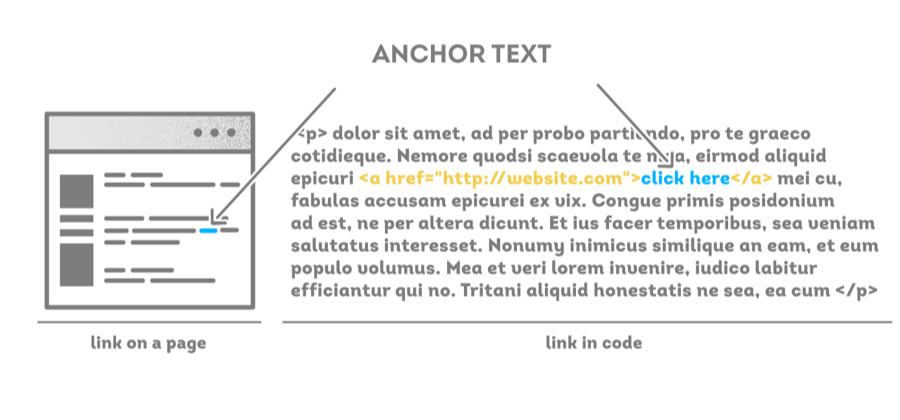
You do this to make sure any link juice (the backlinks that point to a specific page) is passed between your pages and Google can better build your overall topical authority in a niche. Using keywords you want the other page to rank for will help it do exactly that.
And that's it! You've got a blog and blog posts that are better optimized than 99% of the others on the internet. SEO isn't so difficult once you understand the terminology and how to piece together a strategy.
If you liked this thread and learned something new, then it'd be awesome if you could drop it a like and a RT at the top. And if you aren't already following me, then make sure to hit that weird new button and keep up to date with all the SEO goodies I drop like this 📈
@Charles_SEO Huge value here! Cheers, Charles 🔥
@SkintDad Appreciate that mate! 🔥
@Charles_SEO As I keep learning from you Charles… SEO is getting less and less intimidating. Thanks again for all the value.
@tonyverdico No worries Tony!! 👍
@Charles_SEO U sure I shouldn't pay for reading this bro?
@SepuhKau Hahaha!
@Charles_SEO This is so loaded with value, thank you @Charles_SEO
@PenmahJohnson No worries!
@Charles_SEO Best thing for today! Thanks man!
@__simyee__ No worries!
@Charles_SEO Thanks for sharing valuable information. 🙏
@manish_vision No worries Manish!
@Charles_SEO Great thread!
@BloggingChad Thanks man!!
@Charles_SEO What a thread!!🔥
@jayhustlerSEO Thanks Jay! 🔥
@Charles_SEO What about link building? Should we build link for every post that we create or only to home page?
@santoshkumardv Niche dependant, link building is a whole other thread or course 😅