
How to make smarter decisions in the FB ad account with Custom Conversions? (strategy not many people know about) It helps you optimize and understand your funnel If you are: > an eCom store with multi-SKU products > drop shipper testing a lot of products or Check below: 🧵

Go to the product page of the product, > check FB pixel helper, > expand “View content” and > copy the “content_id"
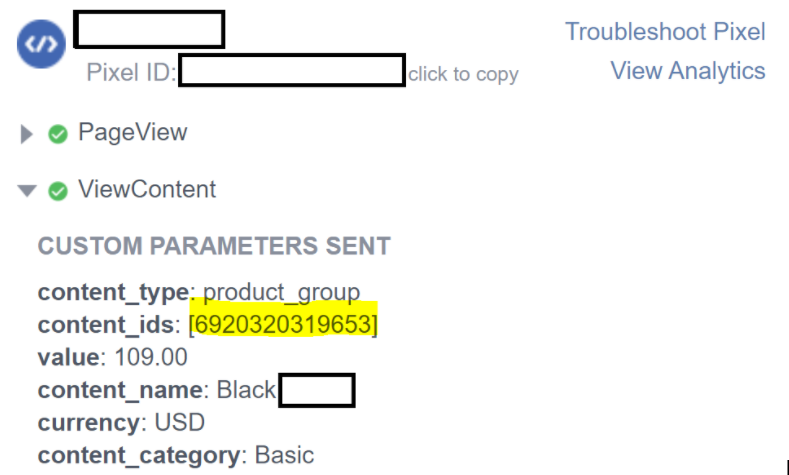
After that go to the “Events Manager” of the ad account, > go to the “Custom conversions” section, > create a new custom conversion, > select pixel, > select Purchase, > select Event Parameters, > select “contend_ids” contains” and > paste the content_ID you copied

From now on, anytime someone buys this product, our custom conversion would be fired. This is helpful when you > have a lot of new arrivals, or > you just want to see what people are usually buying after seeing a certain ad, especially if you are leading them to the homepage.
We have a custom conversion created for almost every product or collection in our store. If you have a particular collection you want to track, you can use multiple content_ids when creating a custom conversion.
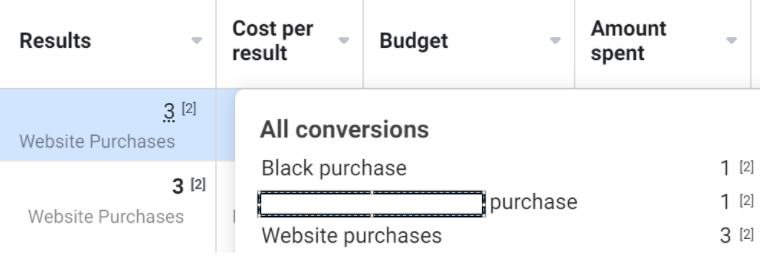
It’s really important to use it when you are validating a new product, cause often we experienced that out of the ad for a new product we got let’s say 10 sales, but only 2 were for the product we want to validate, while the other 8 people bought something else on our website.
That means even though the ad is generally great, the product itself is potentially not as great as the results suggest. You can check these results when hovering over the “results” column in your Ads Manager.
In the screenshot below you can see that from the ad about a 'black' product we got 3 sales and only one was for that 'black' product You can also add that custom conversion as one of the columns in your reporting to make it easier to track the performance per custom conversion.
Before iOS and the limit of 8 events, we even optimized for particular custom conversion if the AOV of a new product is significantly lower or higher than the rest of the products but now we just optimize for purchase and track it in the report. How many of you are using this?
If you need help implementing this strategy in your business, shoot me DM or book a call below: https://calendly.com/marin-ist...
After generating $300m for DTC brands, I’ve realized that 99% of them are making the exact same mistakes that hold them back from scaling to 9 figures So I created f resources on how to overcome to most common FB Ad problems Here it is, for free: https://adresources.inspirebra...
@IstvanicMarin Super insightful as always Marin, thank you for sharing this
@IstvanicMarin Super helpful - Thanks for sharing!
@IstvanicMarin Hi Marin! Have you faced this issue Say you want to make custom conversions(CCs) for products w "silicon" in URL Will it record events? I set it up but it wont record. Been 3 days Asked support but they don't know + no info online abt CCs for this 'single word in URL' use case

@bhushanecomm I make it from content ID not from URL sorry