
How am I 3x more efficient for my clients while in the Ads Manager? > Shortcuts I couldn't live without shortcuts in the FB Ads Manager Here are my 5 most commonly used shortcuts in the Ads Manager and instructions on how to use them (both on Mac and Windows) Bookmark this!
1. CTRL+C (Windows), Command+C (Mac) Obviously, this shortcut is for copying ads and ad sets. Once you select ads or ad sets you want to copy, click CTRL+C and they will be copied. Note that campaigns can’t be copied.
You can always check what items you copied by clicking on the button between the “A/B Test” and “Discard” button

2. CTRL+V (Windows), Command+V (Mac) A shortcut for pasting ads/ad sets. If you want to paste ads, you need to select the Ad set in which you want them to be pasted before clicking it. Same for the ad sets, you need to select the Campaign you want ad sets to be pasted to.
3. CTRL+D (both on Windows and Mac), CTRL+Shift+D (both on Windows and Mac) I use these shortcuts for duplicating ads, ad sets, and campaigns. Without using “Shift” items will be duplicated immediately to the same ad set or campaign.
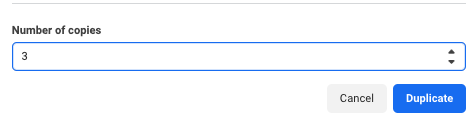
If you are not using ads with “post ID” be careful cause your social proof often doesn’t get carried to a new ad. When using Shift you will get asked what other campaign or ad set you want the items to be duplicated and how many copies you want to create.
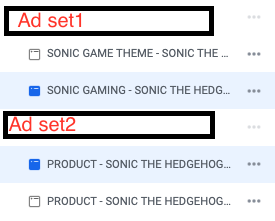
4. CTRL (Windows), Command (Mac) Using CTRL or Command while selecting ads is pretty useful. Often I want to select only certain ads from different ad sets without exiting the "Edit" view of my ad set.
By holding CTRL, you are able to select multiple ads from multiple ad sets, e.g. best ad from each ad set that you want to copy to the new ad set. The same goes for deselecting - when you hold CTRL/Command you can deselect one of the ads or ad sets individually.
5. Shift (Both Windows & Mac) I use it when I need to select multiple ads, but not all of them (e.g 10 out of the 20 ads). Instead of clicking 10 times on each ad, you select the first one, hold Shift and select the last one, and all the ads in between get selected as well.
Bonus Shortcuts Ctrl + U - Open editing for your selected campaigns, ad sets, or ads Ctrl + R - Review all changes before Publishing Ctrl + BACKSPACE - Delete selected campaigns, ad sets, or ads What are some shortcuts you would like to see @Meta introduce?
@IstvanicMarin short cuts change everything
@TylerBevacqua Definitely, cause time = money
@IstvanicMarin Legendary content Marin
@PhilKiel Thank you man 🙏
@IstvanicMarin We need more shortcuts everywhere
@IstvanicMarin Great shortcuts didn’t know some of them!
@IstvanicMarin @readwise save thread
@IstvanicMarin @memdotai mem it
@IstvanicMarin Goat level bro 🐐👌
@Ofm_GodFather haha thanks man it's all about efficiency
@IstvanicMarin Most people don’t know well how Ads manager works. So they spend too long on it to figure it out. And before they know. They give up.
@IstvanicMarin A Lover of shortcut that know what he's doing is the best person to work with