
For any vtubers/streamers who need it, here's how to play music on stream but keep it out of your vods(and also how to listen to something without it picking up on stream at all) First, separate your audio with the Application audio capture. Then in output, select advanced mode
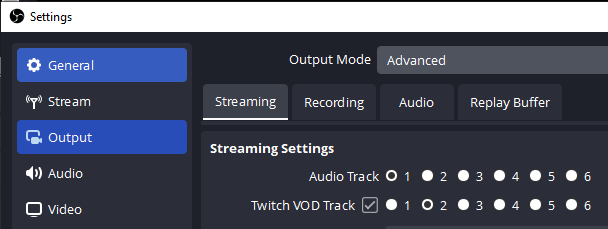
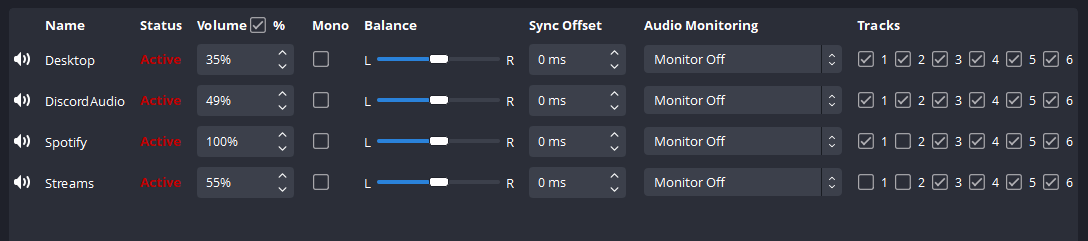
Make sure the Twitch VOD track is checked and select 2 for it. Then, in advanced audio properties, choose which audio should play on which tracks! Here, 'Spotify' plays on the live stream but won't be in the VOD, and 'streams' (my Edge audio) isn't on my stream at all.
This reached more people than expected lol. Quick note as some have mentioned in comments, there is a possibly of getting live DMCA striked, though it is rare and (to my knowledge) happens more with streaming movies/shows or rebroadcasting events you’re not allowed to. Still, do
@LunarGabriel1 @DinkleWinks This is great tip/guide for vtubers and streamers who want to listen to music and not have it on the vod. I used to use this for a while on stream labs and obs. But then at some point every time my stream disconnected my audio would get fucked up upon reconnecting. The only fix
@VirtualDigiGirl @DinkleWinks Yea I did hear another person mention that issue in the replies as well, but it looks like OBS has fixed it in an update
@LunarGabriel1 My 2 brain cell gonna have hard time understanding all this since its new but imma save those screenshots lmao. Very helpful info tho thanks
@Shiro_Freezetic Feel free to shoot me a DM if you need help setting it up
@LunarGabriel1 i tried this and it still didn't work?
@waka_baka Did you make sure to have the audio sources separated first? What's not working with it?
@LunarGabriel1 Does this apply to Streamlabs as well?
@ExeFreezyVT I have no idea if it’s possible with streamlabs
@LunarGabriel1 im after a fix for white noise coming from the computers motherboard even with the mic unplugged
@mutantroosta Oh wow, never heard of that issue I have no idea
@LunarGabriel1 Thank you!
@FortClouds Of course! If you need any help setting it up lemme know
@LunarGabriel1 @Moonpez_ so this works "kinda" just like jaywalking is illegal but you mostly can get away with it. I would still recomend you don't use copyrighted music because you can still get a "liveDMCA" (dont happen often but still do) ALTHOUGH this is great for vods later if you plan to edit them
@CephyGlitch @Moonpez_ Yea for sure, would still be at your own risk if you wanna do it(or you can always just keep the music off track 1 & 2 so you can hear it but stream can’t)
@LunarGabriel1 Took me like a week and 2 copyright strikes to get this working the first time
@LunarGabriel1 I'd like to add on to this ! Because for those that are Recording is almost the same but slightly different. Instead, go to recording and pick in between 1 to 6 where Audio Tracks is. This can depend on a few things. I have 3 set up

@LunarGabriel1 TYSM
@LunarGabriel1 @euskico just in case you need it
@LunarGabriel1 Bless! Thank you for this. I'd be wondering for a while, but hadn't gone to looking for it yet. This popped up in my feed. Perfect timing~!
@LunarGabriel1 Might I also add, it’s probably not best to have desktop audio on any track, and instead add the audio sources of each program instead. That way you can separate your audio tracks on a recording in the future.
@LunarGabriel1 This is super helpful, thank you!
@LunarGabriel1 This is helpful! Thank you!
@LunarGabriel1 you're 👏 a 👏 LIFE SAVER !!! i 👏thought i'd have to do a Royalty Free Music™️ playlist for my upcoming stream 🫠
@LunarGabriel1 THANK YOU THANK YOU THANK YOU SO MUCH AIQVWJVQKEV
@LunarGabriel1 For those that see this and are switching to kick, this does not work there.