
It can be annoying to see "WaitUntilTasksComplete" when profiling in Insights and not knowing what tasks it's waiting on. But you're only a single checkmark away from unlocking multithreaded profiling superpowers in Unreal Insights! 👀 A short 🧵

If you're in the editor, you can click the little "Trace" button in the lower right corner and turn on the "Task" channel. Optionally you can also turn on "Stat Named Events" which enables telemetry for more functions, which I always turn on myself when profiling. 🧵
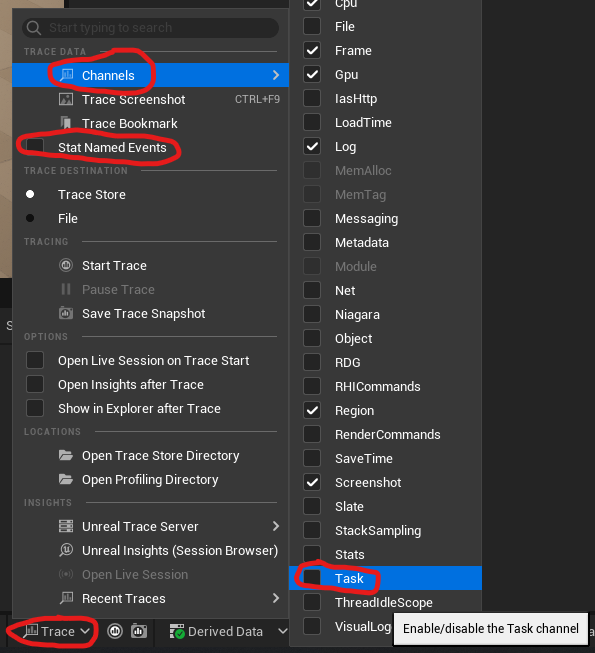
If you're not using the editor and instead profiling a packaged build, you can start the executable with "-statnamedevents -trace=default,task" to do the same. 🧵
Now, when you click a "WaitUntilTasksComplete" function in Insights, it will show arrows the task on the thread it was waiting on! In this case it was an in-editor PSO compilation stutter. Usually I don't care about them in editor as shaders are constantly being changed. 🧵
However for packaged builds these can sometimes affect PC users. Unreal has gotten a lot better at compiling them ad-hoc asynchronously but PSO Precaching can also be warranted in some cases. @t_looman has an excellent write-up on doing that here: https://www.tomlooman.com/psoc... #uetips