OPTIMAL TRACKMANIA VIDEO SETTINGS Going a bit more in-depth rather than just showing my settings, everyone has preferences and I tried my best to explain every choice. Those are probably more tailored towards the competitive players, favoring clarity over looks. Thread 🧵
I'm gonna go 1 by 1 with this. 🔥 - IMPORTANT! DISPLAY DEVICE - for laptops, make sure this is your dedicated GPU, not the integrated one! 🔥 DISPLAY MODE - FULLSCREEN, especially AVOID WINDOWED BORDERLESS as it looks just like Fullscreen but has extra input lag and lower FPS
🔥 FRAME RATE LIMIT - recommended to set it up so that you can hold it consistently! 20FPS over your monitor's Hz, or if you got a good GPU, 2X your monitor Hz If You use Freesync/G-Sync, cap the fps 3fps below your Hz so that the Adaptive Sync doesn't cause stutter V-SYNC - OFF
🔥 CPU & GPU SYNC - recommended 1 FRAME 1 FRAME gets better FPS than IMMEDIATE, and theres no downside to it if You have consistent FPS. Some people might encounter issues when streaming, with 1 FRAME game will feel fine but stream is choppy / viceversa - set it to IMMEDIATE
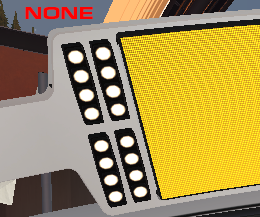
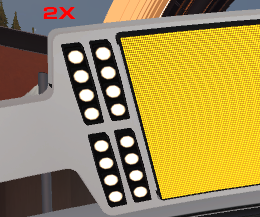
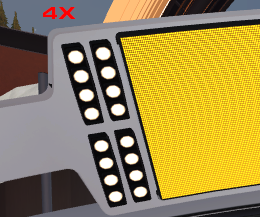
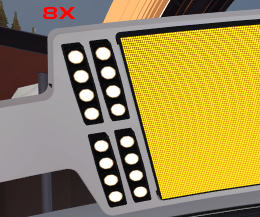
FAST ANTIALIASING - recommended MSAA 2/4x Those will look optimal while not sacrificing much FPS: 2X for 1440p, 4X for 1080p. Below that, game starts to look really pixelated on edges. Moderate FPS drop above 4X. Check the visual demonstration below: none/2x/4x/8x (1440p)⬇️
🔥 NICE ANTIALIASING - OFF Any option here adds A LOT of blur to the car the faster you go, which may intrude with spotting the speedometer etc. CARS CUSTOMIZATION - preference TEXTURE FILTERING - recommended twice as much as MSAA, minor performance effect.
🔥 SHADERS QUALITY - recommended LOW Massive FPS gain, for me +80FPS, sometimes giving better visibility in darker areas. Comes at a cost of not seeing block borders. If You value looks, go for HIGH, but if You don't use custom skids, SDs are much harder due to more smoke.
SHADOW QUALITY - MEDIUM Only difference between NONE and MEDIUM is pixelation at distance. With LOW SHADER QUALITY, options MEDIUM -VERYHIGH are identical. Dont even touch HIGH+. Depending on your Shader Quality, it will either do nothing or add distracting flicker when close.
TEXTURES QUALITY - preference Didn't notice massive FPS gain. I run HIGH, but feel free to experiement with MEDIUM or even LOW if you deem neccessary. REFLECTIONS ON VEHICLES - LOW Using a chrome carskin and want the effect? Go for HIGH, but it cuts the FPS a tiny bit.
REFLECTIONS ON WATER SURFACES - VERY LOW Not noticable at high speeds + water is rare in maps, free FPS. 🔥 OTHER REFLECTIONS - OFF Im conviced this setting actually is a -FPS switch. I tested and didn't spot any visible difference. For me, it's -100FPS. Turn off and forget.
🔥BLOOM AND LENS FLARE - OFF Unneccessary distraction + eyesore above MEDIUM. Most FPS consuming option from my testing. OFF - 630FPS FULL - 500FPS MOTION BLUR - recommended OFF More clarity. There seems to be no performance downside, so if You like it keep it.
COLORBLIND MODE (in System tab) - preference This setting changes the colors of reactors, as well as make map colors more vibrant (green changes to lime, blue to sky blue etc.) I'd compare it to the colorblind mode in LoL. If You like it or it helps You - use it.
That pretty much wraps it up! If You have any questions about this thread, feel free to ask below, I'll answer. I'll also happily take notes, especially on that 'Other Reflections' option cuz I've got no idea what that does. Always happy to learn something. Have a nice day!
Okay wtf happened to the gif conversion, heres the direct comparision of MSAA again