
Model Context Protocol (MCP), clearly explained:
MCP is like a USB-C port for your AI applications. Just as USB-C offers a standardized way to connect devices to various accessories, MCP standardizes how your AI apps connect to different data sources and tools. Let's dive in! 🚀
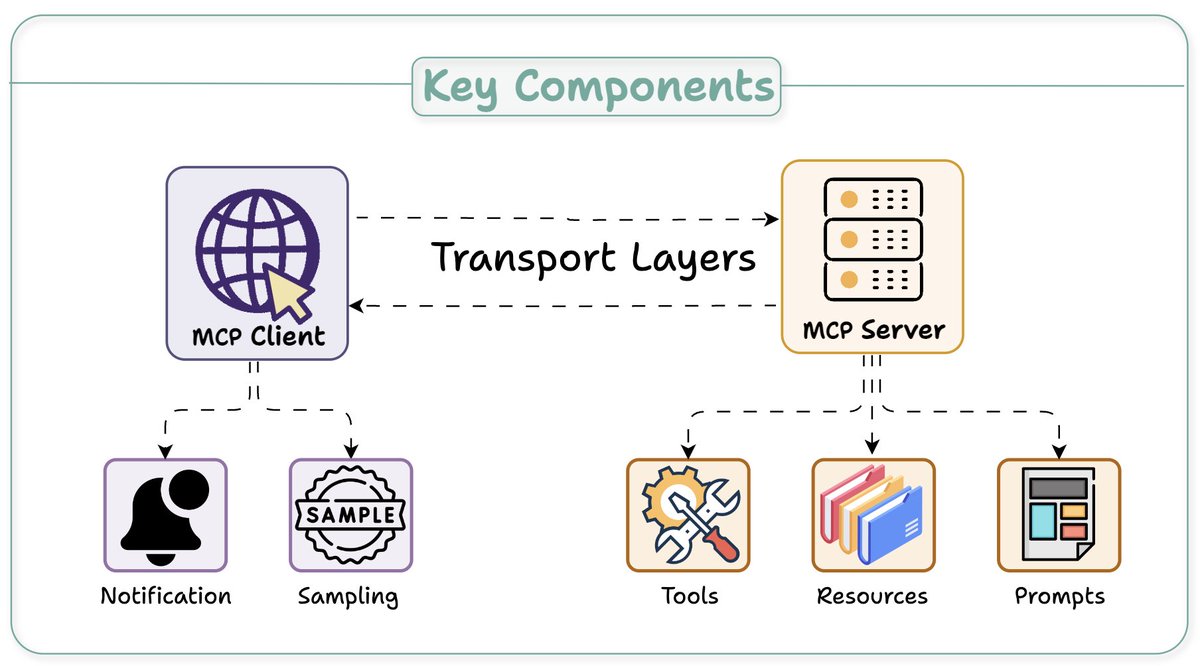
At its core, MCP follows a client-server architecture where a host application can connect to multiple servers. Key components include: - Host - Client - Server Here's an overview before we dig deep 👇
The Host and Client: Host: An AI app (Claude desktop, Cursor) that provides an environment for AI interactions, accesses tools and data, and runs the MCP Client. MCP Client: Operates within the host to enable communication with MCP servers. Next up, MCP server...👇

The Server A server exposes specific capabilities and provides access to data. 3 key capabilities: - Tools: Enable LLMs to perform actions through your server - Resources: Expose data and content from your servers to LLMs - Prompts: Create reusable prompt templates and

The Client-Server Communication Understanding client-server communication is essential for building your own MCP client-server. Let's begin with this illustration and then break it down step by step... 👇
1️⃣ & 2️⃣: capability exchange client sends an initialize request to learn server capabilities. server responds with its capability details. e.g., a Weather API server provides available `tools` to call API endpoints, `prompts`, and API documentation as `resource`.
3️⃣ Notification Client then acknowledgment the successful connection and further message exchange continues. Before we wrap, one more key detail...👇
Unlike traditional APIs, the MCP client-server communication is two-way. Sampling, if needed, allows servers to leverage clients' AI capabilities (LLM completions or generations) without requiring API keys. While clients to maintain control over model access and permissions
I hope this clarifies what MCP does. In the future, I'll explore creating custom MCP servers and building hands-on demos around them. Over to you! What is your take on MCP and its future?
If you found it insightful, reshare with your network. Find me → @akshay_pachaar ✔️ For more insights and tutorials on LLMs, AI Agents, and Machine Learning! https://x.com/akshay_pachaar/s...