
Optimizing CS2 on Nvidia GPU & AMD X3D CPU – Comprehensive Guide Launch Options: Myths vs. Reality Many “tweaks” from CS:GO no longer work in CS2. The Source 2 engine changed what launch parameters are valid. In fact, a Valve developer even stated “Best launch options are no
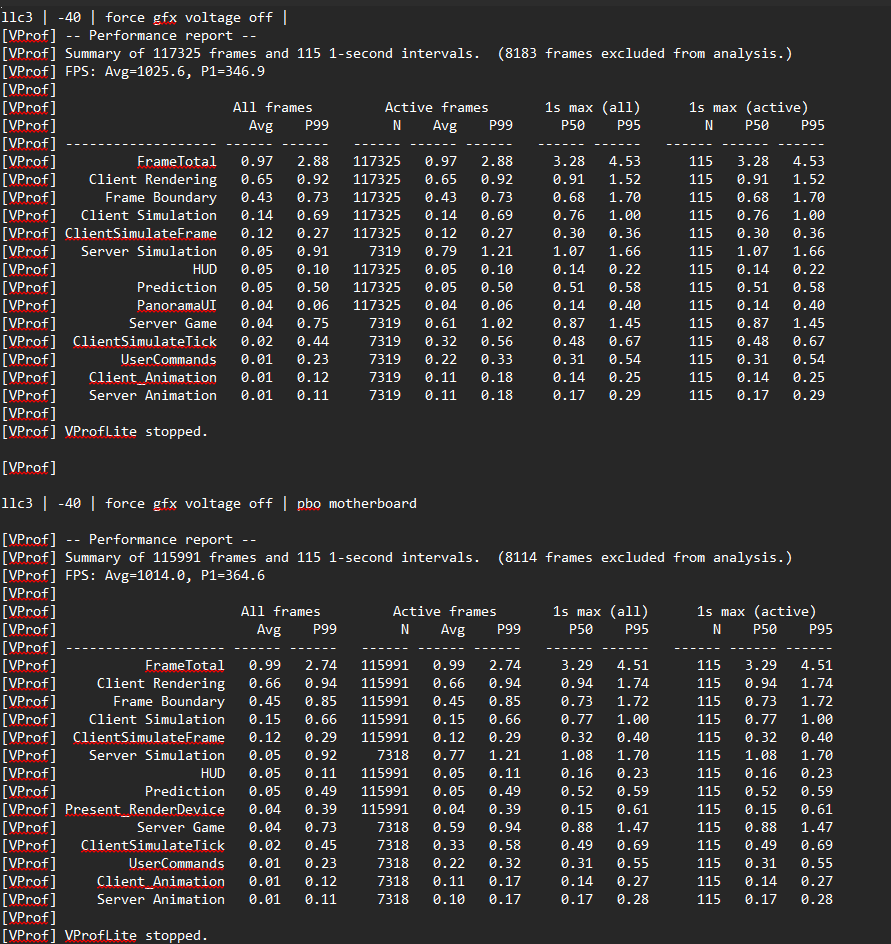
8 runs each setting and setting change over 800 benchmarks total :)

@xTheWhale_ OCing 9800x3d and using tighter ram timings is absolutely worth it, was able to get an additional 50 FPS to 1% lows with a 5.6ghz 1.29v all core fixed overclock (not PBO) without introducing any stutters.
@HamptonPhillip 5.6ghz 1.29v stabel? show cpuz ;)

@xTheWhale_ I have 5700x3d with 3070, im getting avg 550 fps and 206 low1%. I would like to get 300 low1% with my 300hz but sadly there's nothing else to do without going am5
@juicewrld2137 realy hard
@xTheWhale_ I would recommend to also include the low mouse dpi debate in your guide. nobody should use 400dpi because it simply adds input latency. ideally you would go for 1600 and adjust sensitivity accordingly (400@2 = 1600@0.5). this can ACTUALLY result in a 3-5ms lower latency.
@patrik_media did a deboung on it on the last valorant ue5 post.
@xTheWhale_ Running (5080 9800x3d) I turned off microsoft game bar yesterday and the game feels a million times smoother and responsive, felt hitching and lower quality visuals before this. You recommend it turned on though?
@spammy3245 depends on you system ;) normaly if your cpu is in a good way "tunned" your gpu should be at 99% ;) but i guess its not
@xTheWhale_ I did the majority of this this morning and my game is feeling way better, nice work mate 🤙
@Royally____ thanks for leting me know ♥️
@xTheWhale_ @XANTAREScsgo everything what we are need that. great article. 👏🏻👏🏻
@xTheWhale_ Holy ChatGPT
@iMPxNF ask yours to make it XD and see how mich gpt it is ;))))) how many are in the libary make a guess
@xTheWhale_ Bin noch auf win 10 :/ überlege mal auf 11 zu gehen und zu vergleichen

@Melmak40717286 ist doch gut für 4:3 syncmaster DF
@xTheWhale_ I was already running ALL of these settings but must admit I was unaware of vulkan working in CS2. Does it have any issues of its own to report? I'll try it out. Now do one of these for Rust :)
@xTheWhale_ @grok please summarize this and give bullet points of what is recommended to do
@xTheWhale_ @grok summarize the settings, i aint readinga allat
@xTheWhale_ @grok çevir
@xTheWhale_ @grok kanka bu ne anlatio cevirsene
@xTheWhale_ Hello, I have Ryzen 5 5500, RX 5600 XT also my rams 3200 mhz. On DX11 my average FPS is 320-330, with VULKAN 270-280 but it the first time with VULKAN. I was restarted CS for a more test and then game is working with DX12, I was see this on AfterBurner. How this possible ?
@xTheWhale_ Given that you have a good following I’m sure you know what you’re doing but WTF did I just read
@xTheWhale_ The reason why many top players run with Gsync off is because they use Zowie monitors that don't even support variable refresh rate. running VRR gives <1ms additional latency, within margin of error, but it corrects the annoying screen tearing
@xTheWhale_ Are we really going to go based off of what the developers say is "best" for players, didn't they tell us the best solution to frame drops was to set our FPS cap to 60?

@xTheWhale_ To long go read. What do u take out of this?