
Holy sh*t… Claude with XML is a different beast. Anthropic researchers quietly dropped the framework — and no one’s talking about it. It’s like switching from calculator to supercomputer. Here’s the structure they didn’t put in the docs:
Why XML? Claude was trained on structured, XML-heavy data like documentation, code, and datasets. So when you use XML tags in your prompts, you’re literally speaking its native language. The result? Sharper, cleaner, and more controllable outputs. (Anthropic says that XML tag
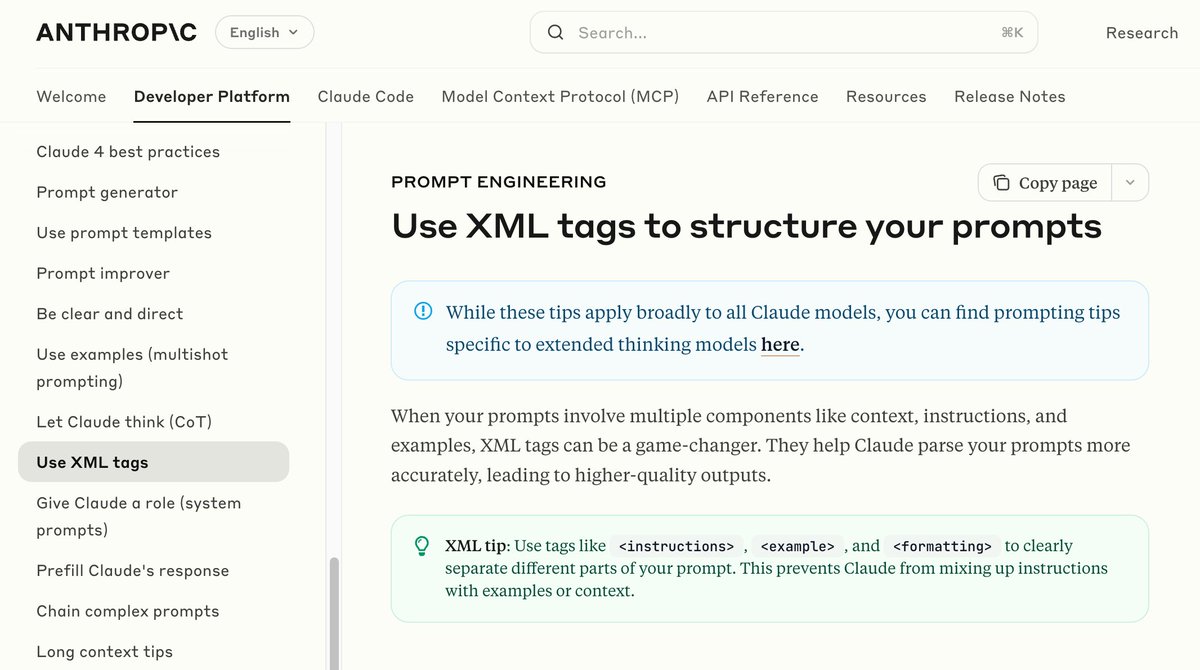
Why it works: ✅ Clarifies intent ✅ Mimics Claude's training structure ✅ Boosts reasoning + structure ✅ Reduces hallucination Now let’s dive into 5 🔥 real-world use cases:
AI Research Assistant Plain prompt: Find the top 3 recent papers on retrieval-augmented generation and summarize each in 2 sentences. XML version: <task>Research and summarize</task> <topic>Retrieval-Augmented Generation (RAG)</topic> <output_format>3 research
LinkedIn Post Writing Plain prompt: Write a LinkedIn post about how AI freelancers are changing traditional employment. XML version: <task>Write</task> <format>LinkedIn post</format> <topic>Rise of AI freelancers</topic> <goal>Highlight disruption of traditional work</goal>
Code a Simple App Plain prompt: Build a Python script that takes a URL, extracts all links on the page, and saves them to a CSV. XML version: <task>Code</task> <language>Python</language> <goal>Extract all links from a URL and save to CSV</goal> <constraints> <libraries>Use
Create a Slide Outline Plain prompt: Create a 5-slide outline for a presentation on the business impact of generative AI. XML version: <task>Create slide outline</task> <topic>Business impact of generative AI</topic> <length>5 slides</length> <audience>Executives</audience>
Here's the prompt template you can use: <task>[What to do]</task> <topic>[Optional subject]</topic> <format>[Output type: Email, Code, Slides]</format> <tone>[Casual, Formal, etc]</tone> <persona>[Optional speaker]</persona> <audience>[Who it's for]</audience> <input>[Your
Claude isn't just "another LLM". When you use XML-style prompts, you unlock: - Multi-step thinking - Cleaner output - Modular control - Fast personalization
90% of customers expect instant replies. Most businesses? Still responding days later. Meet Droxy AI: your 24/7 AI employee: • Handles calls, chats, comments • Speaks 95+ languages • Feels human • Costs $20/mo Start automating: https://try.droxy.ai/now
I hope you've found this thread helpful. Follow me @alxnderhughes for more. Like/Repost the quote below if you can:
@alxnderhughes Isn’t JSON prompting superior to XML though? What do you think @grok
@alxnderhughes Equivalent with JSON or XML>JSON?
@alxnderhughes It's literally in the docs. You even put a screenshot of it in the docs
@alxnderhughes They’ve had this since Claude 3.0, they even released a notebook with a 12k token meta prompt to help people build prompts for the 3.0 models. They also convert json schema to something XML based behind the scenes since the release of the messages API. This is old news.
@alxnderhughes xml tags are game changing for structured outputs been using them for complex api integrations and the consistency improvement is wild. no more json parsing failures or weird formatting issues the framework makes claude way more predictable in production workflows
@alxnderhughes I reckon it’s a game-changer for precision, but I’m not sold yet—feels a bit niche for everyday use. Most of us just want quick, clear answers without the extra tagging hassle. Still, it’s cool to see how deep this tech can go.
@alxnderhughes This is crazy useful. Going to try asap.
@alxnderhughes Markdown as well I presume
@alxnderhughes Try this: <task>Plan</task> <topic>Go-to-market strategy for a vertical SaaS</topic> <format>Detailed bullet points</format> <goal>Identify target ICP, messaging, and distribution channels</goal> You’ll never go back.
@alxnderhughes Claude sucks
@alxnderhughes hacker mode unlocked
@alxnderhughes this changes everything
@alxnderhughes They *did* put it in their docs though?
@alxnderhughes Okay this is wild. It’s like Claude was secretly waiting for someone to speak its native tongue.
@alxnderhughes The <task> + <constraints> combo alone cleaned up my entire API call generator prompt. Didn’t realize how much junk was in my outputs until it was gone.
@alxnderhughes Interesting. A quiet release suggests they're still refining its capabilities. Perhaps wider adoption will come later.
@alxnderhughes Useful
@alxnderhughes Tried the XML structure on a messy data task... and man Claude went from “kinda useful” to “holy sh*t this is a personal analyst.” Massive difference.
@alxnderhughes This is the first time I've seen Claude consistently outperform GPT-4 in structure and reasoning. XML was the missing piece.
@alxnderhughes I haven't used these. but I'll give them a try!
@alxnderhughes Claude was always polite. Now it’s actually useful.
@alxnderhughes Please make it XML for KlangAI, with no alcohol. A dopey, friendly frog
@alxnderhughes This is so very, very dumb and can only be a temporary hack. So now we have high precision on the LLM side and low understanding on the human side.
@alxnderhughes Hi Alex. First of all, thanks for sharing this. 🙌 Very interesting. I am not using Claude, but after your experience, does this method work only for Claude or could you imagine that other models responses could become better with it too?
@alxnderhughes This is true but it's already known since Claude 3 models from what I remember. I'm using this extensively and it indeed works very well.