
AI is the most powerful mentor you could ever have. You can rewire any part of your life in 60 days by creating an AI coach. All you need is ChatGPT, WiFi, and some spare time. 🧵: My Elite AI Coaching System.👇
In this thread, I'll break down a 5-part system you can apply for using AI to create mentors that "coach" you through any skill. This system takes about 60 minutes to set up, but can genuinely help you go from Zero to → Expert in any life skill. Let's dive right in ⬇️
Step 1. Pick The Skill This is the foundation for creating your ideal AI coach. Some areas I would recommend building your GPT coach around: • Finances/Income • Fitness/Health • Business/Startups Identify the high-leverage skill you want to learn before continuing.
Step 2. Identify Traits Once you've picked the skill you'd like AI to help you learn, you need to give the LLM a role model to follow. I.E., if you're looking for AI to become your expert business mentor, you want to identify and assign traits of real-life business mentors.
For this step, here's the prompting framework I recommend using. This step is crucial; don't skip it:

Step 3. Build The Curriculum Now that AI has the goal (step one) and the role to follow (step two), you can start building the curriculum. For this example, I'll be using GPT-5, but I also like Opus 4.1 (Claude) for this step. Prompt for building the coaching curriculum:

This prompt will spit out extremely detailed curriculum learning plans. To showcase its power, I prompted GPT to be my Alex Hormozi-style business mentor. Here is the complete curriculum it gave me for learning business from zero:

The 30/60/90 roadmap:
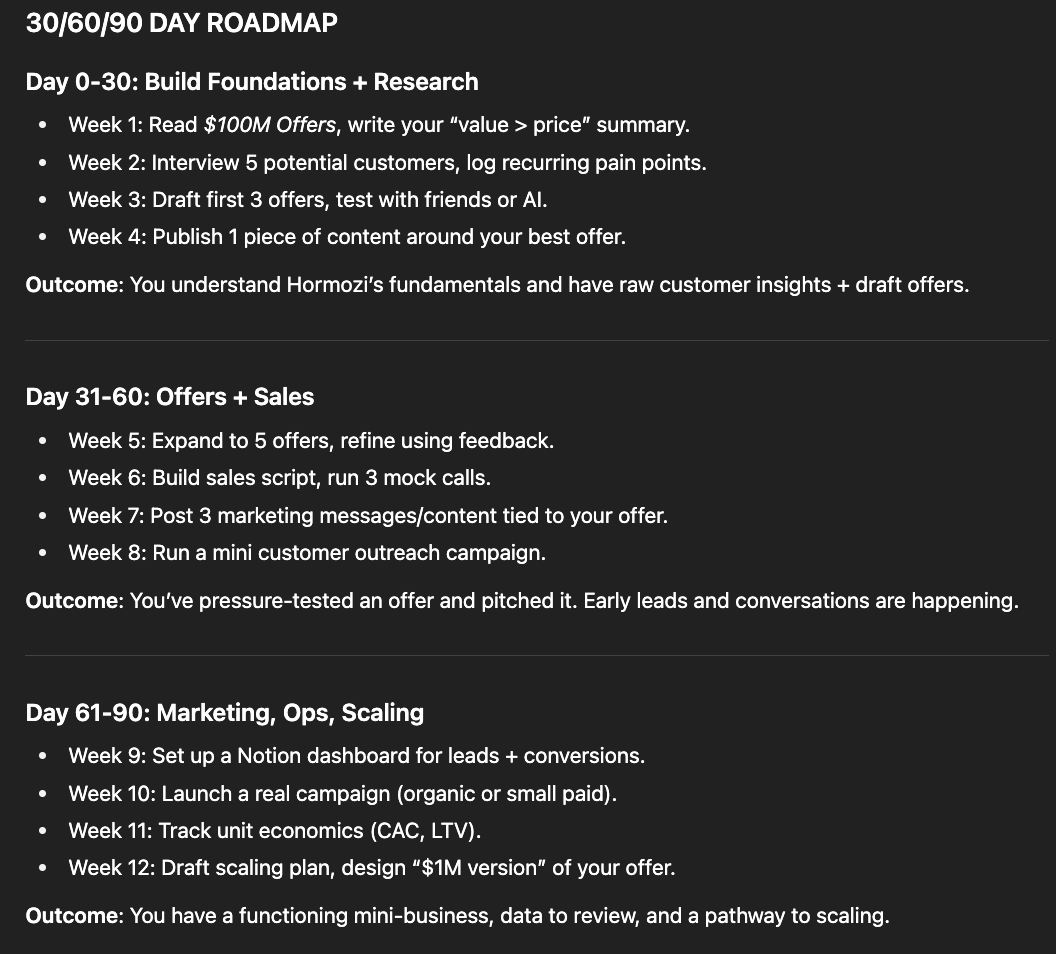
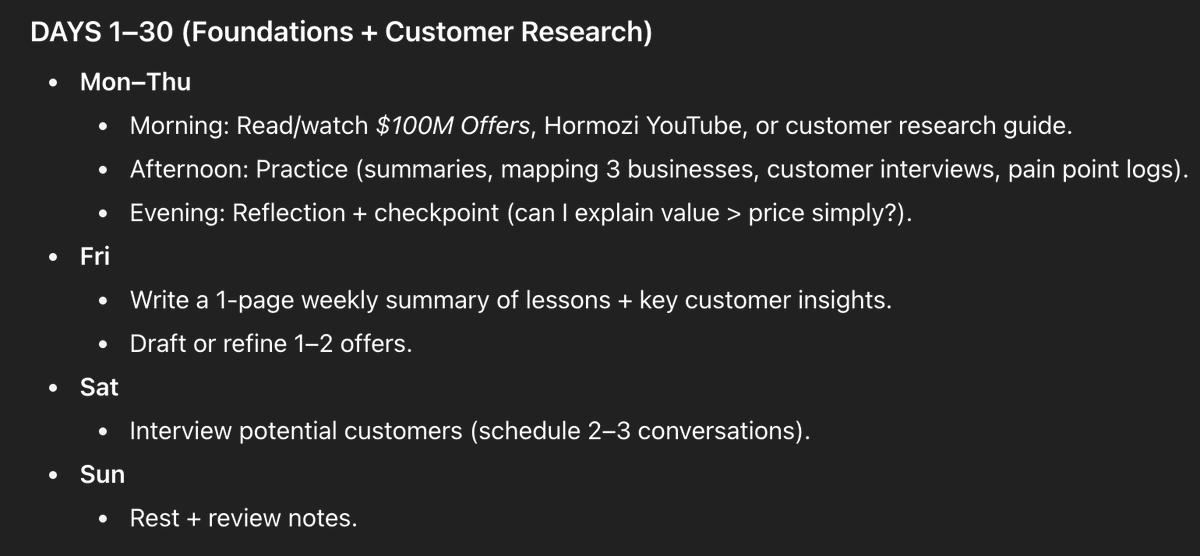
Step 4. Daily Tutor Once you have the roadmap (outlined above), you want to prompt AI to break it down into a learning schedule you can stick to. This could be daily, bi-daily, only on weekends, or really whenever you have time to pursue your new skill.
Note that these study sessions can be as in-depth as you'd like. For this example, I prompted the LLM to create a concise daily learning schedule for each phase of the outlined roadmap. Example output:
Step 5. Feedback + Progress Tracker At this point, you should have your AI mentor completely set up. All that's left to do is create a feedback + progress tracking loop. You can use GPT-5 for this step, but in my experience, Notion is more capable.
What you'll want to do is create a custom Notion database with these properties:

In this new database, you'll upload your "homework" that the curriculum assigns and prompt GPT to analyse your work. For my example of creating an Alex Hormozi business mentor, these are my specific checkpoints:

A few tips for maximizing this system: - Create a custom folder within ChatGPT for better organization - If you do use Notion for the last step, use MCP to connect it to GPT - Experiment with using Claude over GPT for this build (this will require a paid subscription to
This system is extremely powerful if applied to learn the right skills. My suggestion is only to use this system on extremely high-leverage skills you want to learn. You could even use this setup to build full courses about learning AI (prompt engineering, GPT mastery, etc.)

I hope you've found this thread breakdown helpful. If you have any questions, leave them in the comments below, and I'll be sure to respond as best I can. For more AI content like this (and video tutorials), follow me @aiedge_. If you can, Like/Repost the quote below💙
@aiedge_ @milesdeutscher I’m going to try this thank you!
@aiedge_ Love this content Miles
@aiedge_ Done bro
@aiedge_ Hope I win a spot
@aiedge_ Yooooo