
You are sleeping on Grok Image to Video, 👇 FREE Tutorial 👇 Bookmark 👇 Control any character from just a single photo, you can direct and have full control across infinite shots. In mere minutes. Super cheap. You only need: → A photo → Grok dot com Let's begin 🧵 🫡
First you need that photo, here is mine, I used Midjourney to generate it. But you can use whatever you want. Real or AI.

Next we need the shot list. I wrote mine myself. But to save time you can do this: You can use any LLM, Chat, Claude, Gemini, up to you. Since we are in Grok already, I'm using grok for this screenshot.

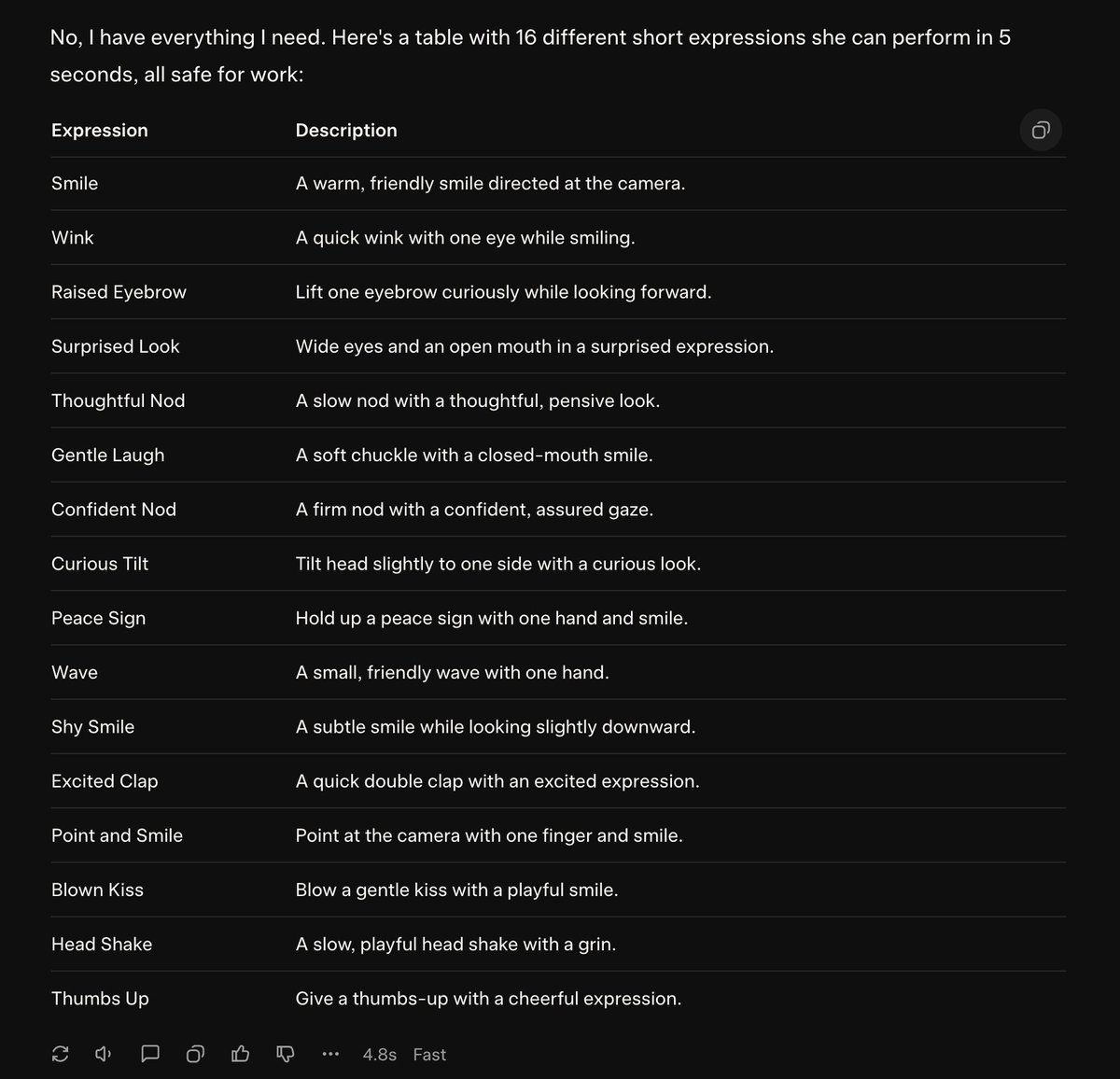
The output will look something like this. This is now your shot list essentially. You can expand on it, make it more tailored to something you are working on, add props, just play around.
In grok, you'll just upload the image using the little paper clip icon.

Here, just upload the photo you want to use.

Instantly grok will start to turn it into a video, but don't worry, we will just add our prompt and generate a new video with our prompt.

Let try this one: "Puts down the glass. Blow a gentle kiss with a playful smile."

Here we got two examples, each video took about 20 seconds to make. Apart from the smoke 🤣 this is a good direction, sometimes it jackpot on first try, sometimes you need 2-4 tries to get a good video. Just redo until satisfied.
Now you can do all sorts of directing at this level. Let's check some of the examples from my initial video. 1. Drink and spill the milk 🫣 2. Pirate ship in milk glass
Let's see if we can pour the milk over her? And if we can have her drink without getting a milk moustache?
We can also direct the subject to start other things: 1. stand up and put the glass down and move towards the light on the wall 2. take both hands and play with your hair
In video creation, grok is powerful for reducing planning time and testing visual ideas. It includes a full image editor to change elements like clothes. However, it's not as advanced as nano or ChatGPT. We can see how it messed up the face.


Let's use ChatGPT instead, way better, now we can use that to make a video. Let's use the splash again because its something that would be hard to do on set over and over, gets really messy.
We can also add small details like, leave a bit of milk drip on the chin. Honestly its really insane what you can do, there are very few limitations. You can direct humans, animals, objects, scenes, props, your imagination is the only limitation.
Reply with your craziest examples below, would really love to see them.
Song in main video is made by King Willonius https://x.com/KingWillonius/st...
I hope you enjoyed this thread 🙏🏼 For more, follow me at @linusekenstam and please Bookmark, Like, Comment & Repost the first Post below to share with your friends:
@manchatz a bit plastic! did you generate image with grok or elsewhere?
@LinusEkenstam Useful, thanks!
@manchatz I want to see you do something crazy with it
@LinusEkenstam this version of the song won it for me 😂
@macbethAI He is freaking legend ✌🏼🫶🏼
@LinusEkenstam Amazing work! 🔥🚒🧯🔥 Tagging: @elonmusk
@LinusEkenstam Fantastic work man!! 🔥⚡
@ai_artist1411 Thank you, hope you found it useful
@HyCe Thats so fun
@LinusEkenstam Why do you want to unblur children’s faces you pedophile
@stinkalobinkalo You are clearly deranged.